Quick Answer: Here’s How to Know If You’re in Control
You own your Google Business Profile (GBP) if, when you search your business name while logged into Google, you see options like “Edit profile,” “Add photo,” or “View performance.” If you don’t see those, you likely don’t have access, or you’re logged into the wrong account.
For many small, family-owned propane companies, this is a very common situation. A Google listing exists, customers can find it, but no one internally knows who actually controls it. And that matters more than you might think.

Step 1: Search for Your Business on Google
Start by searching your business name exactly as a customer would.
Make sure you are:
- Logged into a Google account
- Ideally using a desktop for a clearer view
If you own or manage the profile, you’ll see options like:
- Edit profile
- Add update or photo
- View performance
- Promote
If you see those, you’re in control of the listing.

Step 2: Look for “Claim This Business”
If you don’t see management options, look for a link that says:
- “Own this business?”
- “Claim this business”
If that appears, it means:
- Your business does have a listing
- But it is not currently claimed by you
From here, you can begin the process to verify and take ownership.
Step 3: Check Business.Google.com
Another quick way to confirm is to go to: business.google.com
After logging in:
- If your business shows up → you have access
- If it doesn’t → you either don’t own it or you’re in the wrong account
This is where many propane companies get stuck. The profile was often created by:
- A previous employee
- A marketing intern
- A personal email that no one remembers
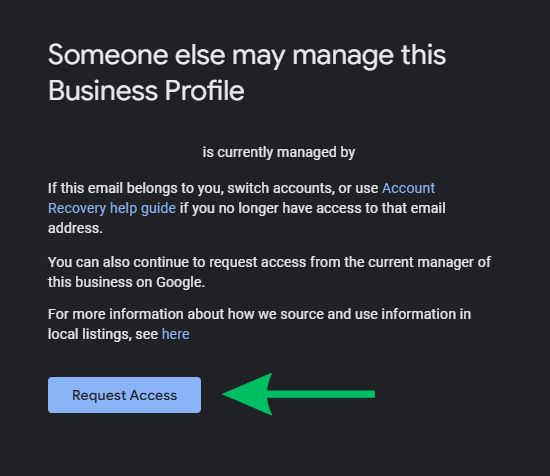
Step 4: What If Someone Else Owns It?
If your listing is already claimed, you can request access directly through Google. Simply click “Own this business?”, and you should see a pop-up to request access.
Google will:
- Notify the current owner
- Give them a chance to respond
- Allow you to request ownership if there’s no response
This step is especially important if:
- Your phone number is wrong
- Your hours aren’t updated for the season
- Your service area is inaccurate
Why This Matters for Propane Companies
For many propane companies, your Google Business Profile is one of your top sources of phone calls.
If you don’t control it:
- You can’t update hours during busy months
- You can’t respond to customer reviews
- You can’t manage how your business appears in nearby towns
In other words, you’re leaving visibility (and calls) up to chance.
Not Sure What You’re Seeing?
If you’re unsure whether you have access or something doesn’t look right, it’s worth getting a second set of eyes on it. We work specifically with propane companies to make sure their listings are claimed, accurate, and set up to generate calls. Even small fixes here can make a big difference.
Learn more about how we work with propane companies across the country.